


Automating client follow-up with AI is really about creating a smart system that handles all those routine client communications for you. Think of it as a digital assistant that automatically sends personalized messages based on specific triggers—like a client signing a document or a deadline approaching.
The real win here is that it frees your legal team from the grind of repetitive administrative work. Instead of spending hours chasing down clients for information or signatures, they can focus on what they do best: high-value, billable casework.
Why Automating Client Follow-Up Is No Longer Optional
Let's be real—manual follow-up is a huge bottleneck for most small and mid-sized law firms. It’s a time-consuming chore that pulls sharp paralegals and attorneys away from billable tasks. This often leads to inconsistent communication, missed opportunities, and even staff burnout.
Imagine a potential client fills out an intake form on your website. If your team's follow-up is slow, that lead's interest quickly fades, or worse, they move on to a competitor who responds faster.

This delay isn’t just a minor hiccup; it directly hits your firm's bottom line. The legal world has its own pace, but we can learn a lot from other industries where speed is everything. For example, sales data shows that prospects are 10 times more likely to convert if they're contacted within the first five minutes. AI-powered follow-up closes that gap, making sure every single lead gets a prompt, professional response right away.
The Immediate Impact of AI Automation
An automated system does more than just schedule emails. It builds a reliable communication engine that works for you 24/7, building client trust and ensuring no one ever falls through the cracks. The positive effects ripple across the firm almost instantly:
- A Better Client Experience: Clients get timely updates and reminders without having to ask. This makes them feel valued and keeps them in the loop.
- Boosted Team Productivity: Your staff can redirect their time toward strategic legal work instead of drafting the same follow-up messages over and over.
- Higher Lead Conversion Rates: Quick and consistent follow-up dramatically improves the odds of turning a potential lead into a paying client, especially when paired with an effective AI intake for law firms.
- Fewer Administrative Mistakes: Automation cuts down on human error, so the right message always gets to the right person at the perfect time.
By putting a system in place for your communication, you're not just saving time—you're crafting a more professional and reliable client journey. That level of consistency is something manual processes just can't match as you grow.
Let's look at a side-by-side comparison to see just how stark the difference is.
Manual vs AI-Automated Client Follow-Up at a Glance
This table breaks down the operational improvements a firm can expect when moving from old-school manual follow-ups to a modern, AI-driven system.
| Metric | Manual Follow-Up | AI-Automated Follow-Up |
|---|---|---|
| Response Time | Hours or days; inconsistent | Seconds or minutes; instant |
| Consistency | Varies by staff member; prone to error | Uniformly professional; error-free |
| Staff Workload | High; repetitive administrative tasks | Low; focused on exceptions and high-value work |
| Client Experience | Inconsistent; clients may feel ignored | Proactive and informed; high satisfaction |
| Lead Conversion | Lower due to delays | Significantly higher due to speed and persistence |
| Scalability | Poor; more clients mean more manual work | Excellent; handles growth without added staff |
The takeaway is clear. While a manual process relies on memory, sticky notes, and calendar alerts—all of which can fail—an AI-powered workflow is built on pure logic and data. It executes tasks flawlessly every single time a trigger is met.
Putting Together Your AI Automation Toolkit
To get AI-powered client follow-up working, you don’t need a massive IT budget or a team of developers. What you really need is a smart combination of a few core tools that talk to each other. Think of it less like building a system from the ground up and more like connecting the right puzzle pieces.
Your Customer Relationship Management (CRM) software is the absolute heart of this whole operation. Whether you're using a legal-specific platform or a general business one, this is where all your client data lives. It's not just a fancy address book; it’s the central nervous system that will tell your AI what to do and when to do it.
The Must-Have Pieces of the Puzzle
For this automated follow-up machine to actually work, your CRM needs to be connected to the other key technologies you use every day. The whole point is to capture a client's action—like filling out a form or signing a document—and use that data to instantly trigger the next step.
Here are the critical integrations you’ll need to set up:
- Client Intake Forms: Your website's contact form is where most new relationships begin. When a prospect fills one out, that data should flow directly into your CRM, automatically creating a new contact and tagging them properly (e.g., "New PI Lead"). This is what kicks off your initial welcome sequence.
- Messaging and Communication Platforms: This is a big one. Your email, SMS platform, and any on-site chat tools have to be synced with your CRM. This creates a single, unified record of every conversation, which gives your AI the background it needs to send a follow-up that actually makes sense.
- Call Tracking Software: If your firm gets a lot of inbound calls, call tracking is non-negotiable. It logs who called, when, and for how long, right into their CRM record. This data is perfect for triggering a follow-up text like, "Thanks for your call today. Here’s the link I mentioned…"
- Document Management and E-Signature Tools: Getting a retainer signed is a major milestone. By connecting tools like DocuSign or HelloSign, that signature can trigger an immediate "Thank you for signing" email, along with a clear outline of what happens next.
If these systems are all siloed, you’re stuck. Your intake tool knows you have a new lead, but your email system doesn’t, and that’s exactly why things fall through the cracks with manual follow-up.
Picking Tools That Play Well Together
Honestly, the specific brand of software you use matters less than its ability to connect with everything else. Modern legal CRMs like Clio, MyCase, or Lawmatics are built for this, often having ready-made integrations. If you're using something more general like HubSpot or Salesforce, a tool like Zapier can be your best friend, acting as the glue between your apps.
For example, a lot of firms are now using chatbots for law firm websites. A properly integrated system will take that entire chat transcript and automatically attach it to the new contact record in your CRM. Now, your AI knows exactly what the person's issue is before it even drafts that first follow-up email.
The real power here isn't in one amazing piece of software. It's in the synergy you create when your CRM, intake forms, and messaging tools are all sharing information seamlessly. This unified data flow is what makes your automation truly intelligent.
Think about how this would work for a personal injury firm. A potential client fills out a form on their website. That data goes straight into their CRM, which then tells their email tool to start a welcome series. If that person clicks a link to book a consultation, that action is fed back into the CRM, which then stops the automated emails and creates a task for a paralegal to prep the file. Every single step is connected and tracked without anyone having to lift a finger.
A Practical Implementation Roadmap
Alright, let's move from theory to practice. This is where the real value of automating client follow-up with AI clicks into place. This roadmap is designed to give you a direct path to setting up your own system, turning the client data you already have into a powerful, responsive communication engine.
The whole process starts by connecting the dots between your firm's core technologies. Think about how information flows right now—from the moment a potential client fills out a form, into your CRM, and then out through your messaging platforms. Getting that flow right is the foundation for any intelligent automation.
This diagram gives you a great visual of what that should look like:
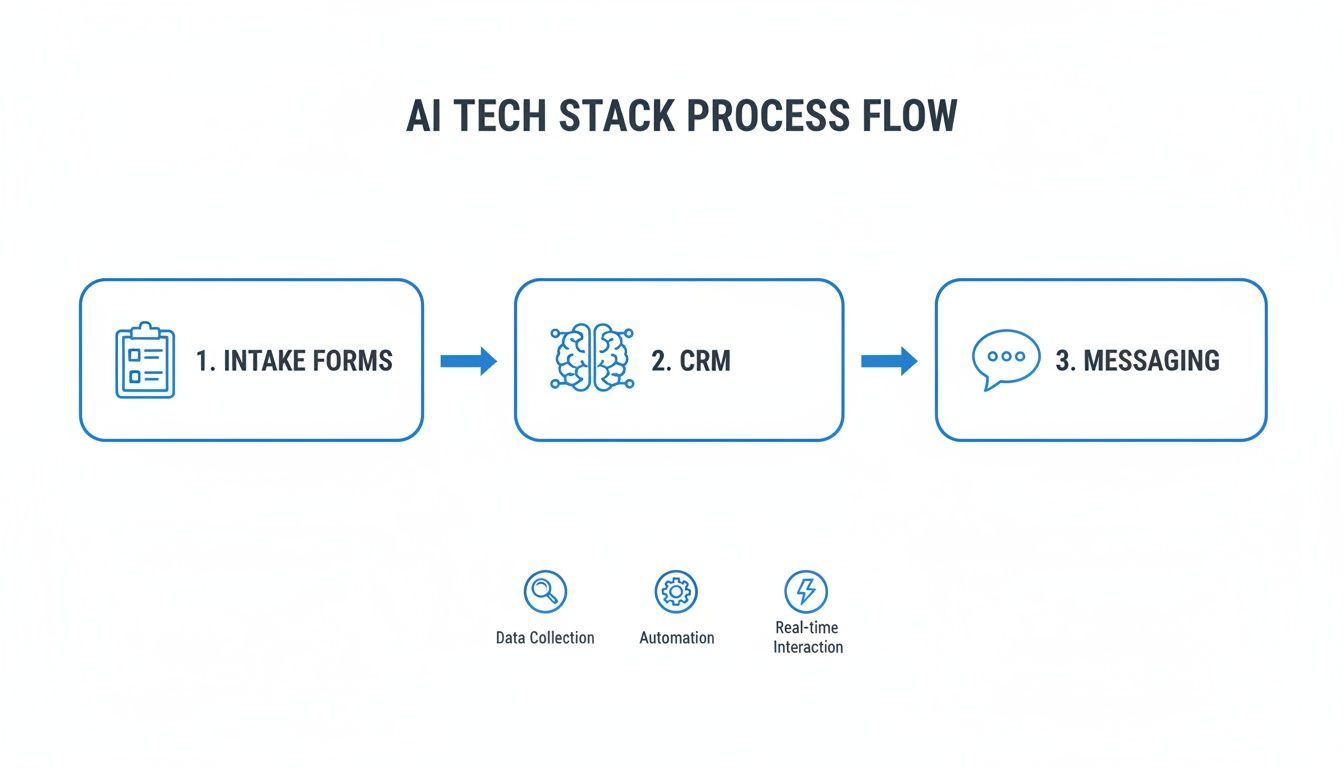
When this flow is seamless, the AI can act with genuine context. That's the secret to making sure every automated message is both timely and genuinely relevant.
Define Your Automation Triggers
Every smart automation I've ever built starts with a "trigger"—a specific event that tells the system, "Okay, do this now." Think of them as the simple "if-then" commands for your follow-up machine. Without clear triggers, your system is just a bunch of expensive, disconnected tools.
Your triggers should be tied to the most important moments in a client's journey with your firm. For most law firms, these are the no-brainers:
- New Lead Submission: The instant a potential client hits "submit" on an intake form.
- Document Signature: Right after a client signs a retainer or another key document.
- Appointment Scheduled: The moment a consultation is locked into your calendar.
- Invoice Sent: When a bill is generated and sent out.
- Case Milestone Reached: For example, when a specific motion is filed or a discovery request is sent.
Nailing down these moments is your first real step toward a responsive, helpful follow-up process. It’s also a critical piece of the puzzle for other AI-driven strategies, like the ones we cover in our guide to AI-powered lead scoring for attorneys.
Crafting Message Templates That Sound Human
This is where so many firms get it wrong. One of the biggest red flags of bad automation is a message that feels cold and robotic. Your goal here is to build a library of templates that truly reflect your firm's voice—professional, empathetic, and always clear.
Before you write a single word, outline the purpose of each message. Is it confirming an appointment? Nudging them for a missing document? Just providing a quick status update? Every template needs one, and only one, clear objective.
Pro Tip: My advice is to write your first drafts as if you were talking directly to a client on the phone. Get the human tone right first. Then, you can use AI to help refine the language for clarity, but never let it strip out that personality. The best automated messages don't sound automated at all.
And please, avoid the overly formal legal jargon. Stick to simple, direct language that clients will actually understand. This builds trust and cuts down on confusion, which makes the entire client experience smoother.
Designing AI Prompts for On-Brand Communication
Your AI doesn't magically know your firm's style. You have to teach it. You do this by writing carefully designed prompts that act as a set of instructions, guiding the AI on how to generate the follow-up content.
For instance, don't just tell it, "Write a follow-up email." That’s lazy and you’ll get a generic, useless result. Instead, get specific:
Example Prompt for an AI Assistant:
"Draft a friendly and reassuring email to a new personal injury client who just signed their retainer agreement. The tone should be empathetic and professional. Confirm we have received the signed document and briefly outline the next step, which is our team reviewing the file and contacting them within 3 business days to schedule an introductory call."
That level of detail is what ensures the AI's output actually matches your firm's communication standards, every single time. You’re giving it context, defining the tone, and specifying the exact call to action.
Building Personalization Rules with CRM Data
Now for the final piece of the puzzle: personalization. This is what makes an automated message feel like it was written just for that one person. Your CRM is a goldmine of the data you need to make this happen.
By setting up a few simple rules, you can tell your system to pull specific data points straight from your CRM and plug them into your message templates. In the tech world, these are often called personalization tokens or merge fields.
Here are a few of the essentials you should be using:
{{client_first_name}}: The absolute bare minimum. Always use their name.{{case_type}}: This lets you tailor the message to their specific matter (e.g., "your car accident case" vs. "your estate planning matter").{{attorney_name}}: Assigns the message from the correct lawyer on the case.{{last_interaction_date}}: Referencing your last conversation adds great context and shows you're paying attention.
This isn't just a "nice-to-have." This strategy has a proven, bottom-line impact. In fact, by 2025, AI is expected to slash customer service operational costs by about 30% simply by making workflows like this more efficient. We're already seeing evidence that AI can cut initial response times by 37% and resolve complex cases 52% faster, which just shows the incredible value of getting this right.
Navigating Ethical and Compliance Guardrails
Automating your client follow-up is a huge efficiency win, but it opens a new chapter in your professional responsibilities. We're talking about more than just software; we're talking about upholding your ethical duties in a new context.
In our world, the convenience of technology can never, ever come at the expense of client confidentiality. The stakes are just too high. A sloppy automation could accidentally leak sensitive case details, or a vague automated text might be misinterpreted as formal legal advice. Getting this right isn't just a good idea—it's a core professional obligation.
Protecting Attorney-Client Confidentiality
The moment you plug a third-party AI tool into your client database, you’ve introduced a new link in the confidentiality chain. And your firm is 100% responsible for it. This means you have to be relentless when vetting your tech partners.
Before you even think about signing a contract, you need to get under the hood of their security and data handling policies. Don’t just look for a generic compliance badge like SOC 2. You need to see features built for the realities of a law practice.
Here’s what you should be asking for—and frankly, demanding:
- End-to-End Encryption: Is client data locked down tight, both when it's moving and when it's sitting on their servers? It has to be unreadable to anyone who isn't supposed to see it.
- Granular Access Controls: Can you control, on a user-by-user basis, who sees what? Your paralegal shouldn't have the same access rights as a managing partner.
- Data Residency Options: Do you have a say in where your data is physically stored? For firms dealing with specific jurisdictional rules, this can be a deal-breaker.
Think of it this way: you wouldn't discuss a sensitive case in a packed coffee shop. So why would you process that same information on a platform that isn't built like a fortress? The environment is digital, but the principle of confidentiality is timeless.
Your duty to protect client information doesn't bend for technology. The diligence you apply to choosing your AI tools is a direct reflection of that core ethical promise.
The Importance of Clear Disclaimers
Let's be blunt: clients need to know if they're talking to a machine. There's no grey area here. When communication feels human, people assume it is human, and that's where trust can be broken and misunderstandings can spiral.
Every single automated touchpoint—email, text message, website chat—needs a crystal-clear disclaimer. It’s all about setting expectations and making sure a client doesn’t think they’re getting real-time legal counsel from a bot.
Here’s a simple, effective SMS disclaimer that works:
"This is an automated message from [Law Firm Name] confirming your appointment. This number is not monitored for legal questions. Please call our office directly at [Phone Number] to speak with our team."
This little message does two critical things. First, it states exactly what it is. Second, it gives the client an immediate off-ramp to a real person. Without that clarity, you're inviting someone to text sensitive case information into an unmonitored inbox, creating a mess you don’t want.
Smart Data Retention Policies
Your data retention policy just became one of your most important risk management tools. Hoarding client data in your automation platforms indefinitely is just asking for trouble. The more data you keep, and the longer you keep it, the bigger the headache if a security breach ever happens.
Your firm needs a written policy dictating how long client data lives in your AI, CRM, and messaging tools after a matter is closed. It should be a practical balance between your legal obligations and your actual business needs.
For example, you might decide to purge detailed case notes from your automation platform 90 days after a case is closed, while keeping basic contact info for future marketing.
A disciplined retention schedule shrinks your firm’s data footprint. This reduces your liability, simplifies compliance, and demonstrates that you’re a responsible steward of the sensitive information clients entrust you with.
Testing and Optimizing Your Follow-Up System
Getting your automated follow-up system live is a huge step, but don't pop the champagne just yet. This is where the real work—and the real payoff—begins.
The biggest mistake I see firms make is treating this as a "set it and forget it" tool. That approach almost guarantees you'll leave opportunities on the table. Think of your system less like a finished product and more like a new associate who needs coaching and feedback to perform at their best. To do that, you have to get comfortable with the data.

A/B Testing Your Templates and Timing
One of the most powerful tools in your optimization toolkit is A/B testing (or split testing). The concept is simple: you create two versions of one thing—an email, a text message, a subject line—and send them to different groups of people to see which one works better.
It's easy to get lost in the weeds here, so start by testing the elements with the biggest potential impact.
- Subject Lines: Pit a formal subject line like "Your Case Update from [Firm Name]" against a more personal one, such as "Quick update on your case, {{client_first_name}}." You might be surprised which one gets more opens.
- Message Content: Try a short, to-the-point email versus a longer one that details the next steps. Does one generate more questions than the other? That's valuable intel.
- Follow-Up Cadence: Is there a difference in response rates if you follow up two days after a consultation versus five? Let the data decide for you.
- Call to Action (CTA): Test a button that says "Schedule Your Strategy Session" against a simple text link that says "Find a time on my calendar."
The golden rule of A/B testing is to change only one thing at a time. If you change both the subject line and the call to action, you'll never know which change actually made the difference.
Defining Your Key Performance Indicators
So, how do you know if your A/B tests are actually working? You need to track the right metrics. Your Key Performance Indicators (KPIs) are the vital signs for your automated system, turning guesswork into informed, strategic decisions.
The goal isn't just to send more messages; it's to get better results. Tracking the right KPIs tells you if your automation is actually improving client engagement and saving your firm valuable time.
Focusing on a handful of core metrics will give you a clear, actionable picture of your system's performance.
This table breaks down the most critical KPIs for law firms to monitor when automating client follow-up. By keeping a close eye on these numbers, you can directly measure the impact of your efforts and fine-tune your approach for maximum effectiveness.
Key Performance Indicators for AI Follow-Up Success
| KPI | What It Measures | How to Track It | Optimization Goal |
|---|---|---|---|
| Client Response Rate | The percentage of automated messages that get a reply. | Most CRMs and automation platforms track this natively. Divide replies by total messages sent. | Increase over time. A rising rate shows your messaging is becoming more relevant and engaging. |
| Conversion Rate | The percentage of potential clients who take a specific action (e.g., book a consultation). | Track link clicks or form submissions from your automated messages in your CRM or intake software. | Increase over time. This directly ties your automation efforts to new business. |
| Time to First Response | The average time from when a new lead contacts you to when they receive the first communication. | Your automation platform's logs will show timestamps. Calculate the average time gap. | Decrease to as close to instant as possible. Speed is a massive competitive advantage. |
| Administrative Time Saved | The estimated hours your staff no longer spends sending manual follow-ups. | Survey your team before and after implementation. (e.g., "How many hours a week do you spend on follow-up?"). | Increase over time. This quantifies your ROI and frees up your team for higher-value work. |
Tracking these numbers gives you a clear picture of what's working and what needs to be adjusted. It's a continuous feedback loop.
In fact, insights from sales automation statistics and trends show that 88% of sales teams are already using AI-powered conversation intelligence tools for this kind of analysis. It's no surprise that 53% of them report higher customer satisfaction after adopting these tools. They provide the deep analytics you need to keep refining your strategy and getting better results.
Your Top Questions About AI Follow-Up, Answered
Bringing new tech into a law firm always raises a few eyebrows, and for good reason. In our world, trust and precision are everything. So, if you're feeling a little skeptical about letting AI handle client communication, you're not alone. It's smart to ask tough questions.
Let’s get right into the most common concerns I hear from attorneys and give you some straight answers.
Can AI Really Handle Sensitive Client Communication?
This is the big one. The short answer is yes, but only when it’s used for the right kind of communication.
The goal isn't to have an AI chatbot giving legal advice or consoling a client through a difficult deposition. That’s your job. The real power of AI here is in taking over the repetitive, administrative tasks that eat up your day.
Think about it: appointment reminders, requests for standard documents, or just a quick "We received your signed retainer" confirmation. These are perfect for automation. They’re necessary touchpoints that keep clients informed, but they don't require your specific legal expertise. Getting these off your plate frees you up for the conversations that truly matter—the ones that need your empathy and strategic mind.
Plus, you can train modern AI on your firm's unique voice. By feeding it examples of your past emails and setting clear guidelines on tone, you can make sure every automated message sounds like it came straight from you.
What’s the Real Cost to Set Up an AI Follow-Up System?
It's probably not what you think. When lawyers hear "AI system," they often picture a six-figure enterprise software project. For a small or mid-sized firm, that's just not the reality.
You might be surprised to learn that many of the tools you already use—your practice management software or CRM—have powerful automation features built right in. For many firms, a really effective system can be built for just a few hundred dollars a month in software subscriptions.
The biggest investment isn't money; it's the time you'll spend on the initial setup and learning curve. But once it's running, the ROI from reclaimed hours and higher conversion rates usually pays for itself in just a few months.
What's the Biggest Mistake Firms Make With Automation?
Hands down, the worst mistake is sending out generic, robotic messages. Nothing turns off a potential client faster than an email that feels cold and impersonal. An obviously automated message can be worse than no message at all.
To get this right, you have to lean on the data in your CRM. Every single communication should be personalized. At a bare minimum, use the client's name and reference their specific case type. A follow-up about their "car accident claim" is a world away from a generic one about "your legal matter."
Another critical mistake is not giving clients an easy "off-ramp." Every automated message needs to provide a simple way to get in touch with a real person. If they have a question, they shouldn't have to battle a robot to get an answer.
Where Is This AI Technology Headed in the Future?
Right now, most systems are reactive. A prospect fills out a form, and an email is triggered. The future is about AI becoming proactive and agentic.
Here’s what that means:
-
Anticipatory AI: Tomorrow's systems will learn the typical patterns of a case and anticipate a client's needs. Imagine an AI that notices a client hasn't heard from the firm in a while and automatically sends a reassuring status update—before the client even has a chance to worry. It will know that at certain stages of a case, anxiety tends to spike.
-
Agentic AI: This is where AI starts handling multi-step processes on its own. For example, it could request a missing document, send a confirmation once it's uploaded, and then automatically update the case file in your CRM, all without a human lifting a finger. We’re also going to see much smarter sentiment analysis, where the AI can detect frustration or confusion in a client's email and adjust its own tone accordingly.
At RankWebs, we help law firms put modern marketing strategies and AI tools to work for real, sustainable growth. Find more insights on building a more efficient and competitive firm over at https://rankwebs.com.