


In the legal world, the window to turn a new lead into a signed client is shrinking. It’s often a matter of minutes, not days. An AI lead response system is your firm's automated front line, making sure you instantly engage with potential clients who reach out online—any time, day or night. This isn't just a fancy tool; it's quickly becoming the deciding factor between landing a great case and watching it go to a competitor who was just a little bit faster.
Why You Can't Afford to Wait on New Leads
Let's paint a picture. It's 8 PM on a Friday. Sarah was just in a bad car accident and is frantically searching online for a personal injury lawyer. She lands on your website, fills out your contact form with all the details, and hits "send."
Then… silence.
An hour goes by. Feeling anxious and ignored, Sarah keeps searching. She finds another firm, fills out their form, and—ding—her phone buzzes with an instant, empathetic text message. It confirms they got her info and even lets her schedule a call for the next morning. When your intake team finally calls her on Monday, it's too late. Sarah has already signed with the other firm.
The Response Time Gap is Getting Wider
This isn't a made-up story; it's the reality of how clients are won and lost today. Potential clients don't just want an immediate response; they expect it. Every minute you delay is an open invitation for another firm to swoop in. This is where an AI lead response system for lawyers stops being a "nice-to-have" and becomes a critical part of your intake process. Think of it as your firm's digital receptionist—one that never sleeps.
The numbers don't lie. A recent study highlights a stark divide: 25% of law firms now respond to online leads in under 5 minutes. That's a huge leap from just 13% in 2021, and automation is the driving force. On the flip side, a shocking 39% of firms still take more than two hours to reply or never respond at all. This creates a massive competitive advantage for firms that have embraced AI. You can dig into more of these findings in the Hennessey Digital 2025 Lead Form Response Time Study.
Here's a quick look at how the old way of handling leads stacks up against a modern, AI-powered approach.
Manual Intake Vs AI-Powered Response
| Feature | Manual Lead Response | AI Lead Response System |
|---|---|---|
| Response Time | Hours or days; dependent on staff availability. | Instant; typically under 1 minute. |
| Availability | Limited to business hours (e.g., 9-5, Mon-Fri). | 24/7/365, including nights, weekends, and holidays. |
| First Impression | Often delayed, creating uncertainty for the lead. | Immediate and professional, making the lead feel valued. |
| Qualification | Relies on a human to manually review each lead. | Pre-qualifies leads automatically using your firm's criteria. |
| Consistency | Varies by a team member's workload and mood. | 100% consistent messaging and process for every lead. |
| Cost | High overhead for staffing after-hours intake. | Scalable and cost-effective, no overtime pay. |
The table makes it pretty clear. An AI system doesn't just do the same job faster; it fundamentally changes the nature of your intake process, making it more efficient, reliable, and client-friendly from the very first touchpoint.
Shifting from Reactive to Proactive Intake
Without an automated system, your firm is always playing catch-up. You're constantly chasing leads that might have already found someone else or simply lost interest. An AI-powered system completely flips that script.
By making that first contact immediately, intelligently, and consistently, you take control of the client's journey right from the start. This ensures every single dollar you spend on marketing has the best possible chance of turning into a signed case.
The benefits are immediate and undeniable:
- 24/7 Availability: You'll capture and qualify leads that come in during the evening, on weekends, or over holidays—precisely when your team is offline but potential clients are looking for help.
- Consistent Qualification: The AI uses your firm's specific criteria to screen every single inquiry, so your intake specialists can focus their valuable time on the best potential cases.
- A Better Client Experience: A fast, professional acknowledgment makes potential clients feel heard and respected from their very first interaction with your firm.
Choosing The Right AI System For Your Firm's Goals
Before you even look at a demo or a sales pitch, you need to get crystal clear on one thing: what problem are you really trying to solve with AI? Without a specific goal, you're just shopping for tech, not a solution.
Are you losing potential clients because inquiries that come in after 5 PM go unanswered until morning? Maybe your main headache is the inconsistent quality of information your intake team gathers. Or perhaps it's a numbers game—you need to lower your client acquisition cost and make sure your marketing dollars aren't being torched on leads that never get a response.
A personal injury firm, for example, might be laser-focused on 24/7 availability to instantly engage someone who's just been in an accident. On the other hand, a family law practice might prioritize an AI that can gently and empathetically collect sensitive details before a formal consultation.
Pinpointing your main objective—whether that’s speed, better qualification, or cost savings—is the single most important decision you'll make. It’s what separates a tool that delivers real ROI from one that just becomes another monthly expense.
To Build Or To Buy An AI System
With your goal in mind, you'll face the classic "build versus buy" dilemma. While the idea of a custom-built system tailored perfectly to your firm has its appeal, I can tell you from experience that for over 95% of law firms, buying a ready-made solution is the smarter, more practical choice.
Let's be blunt: building a custom AI is a massive undertaking. You're looking at huge upfront development costs, the ongoing headache of maintenance, and the incredibly complex challenge of ensuring everything is compliant with legal ethics and data security rules. It’s a full-time job that pulls you away from what you do best: practicing law.
Opting for a proven, off-the-shelf system just makes more sense. You get:
- Speed to Launch: You can be up and running in a matter of days, not the months or even years a custom build would take.
- Predictable Costs: Subscription models eliminate the sticker shock of a huge capital investment.
- Baked-In Compliance: Reputable legal tech vendors have already done the heavy lifting on security and ethical guardrails.
- Ongoing Support: The vendor handles all the tech support, bug fixes, and new feature rollouts, so you don't have to.
If you want to get a sense of the landscape, you can check out some of the best AI tools for law firms to see how different platforms are built for specific legal niches. This will give you a much better feel for the market before you commit.
Essential Features For Your AI Intake System
When you start looking at different platforms, it’s easy to get wowed by flashy bells and whistles. My advice? Ignore the noise and focus on the core features that directly serve the goal you already defined. An AI lead response system for lawyers is much more than a simple chatbot; it’s the new front door to your firm.
This flowchart shows exactly what I mean. It visualizes how AI can instantly turn a slow, leaky lead process into a streamlined qualification machine.
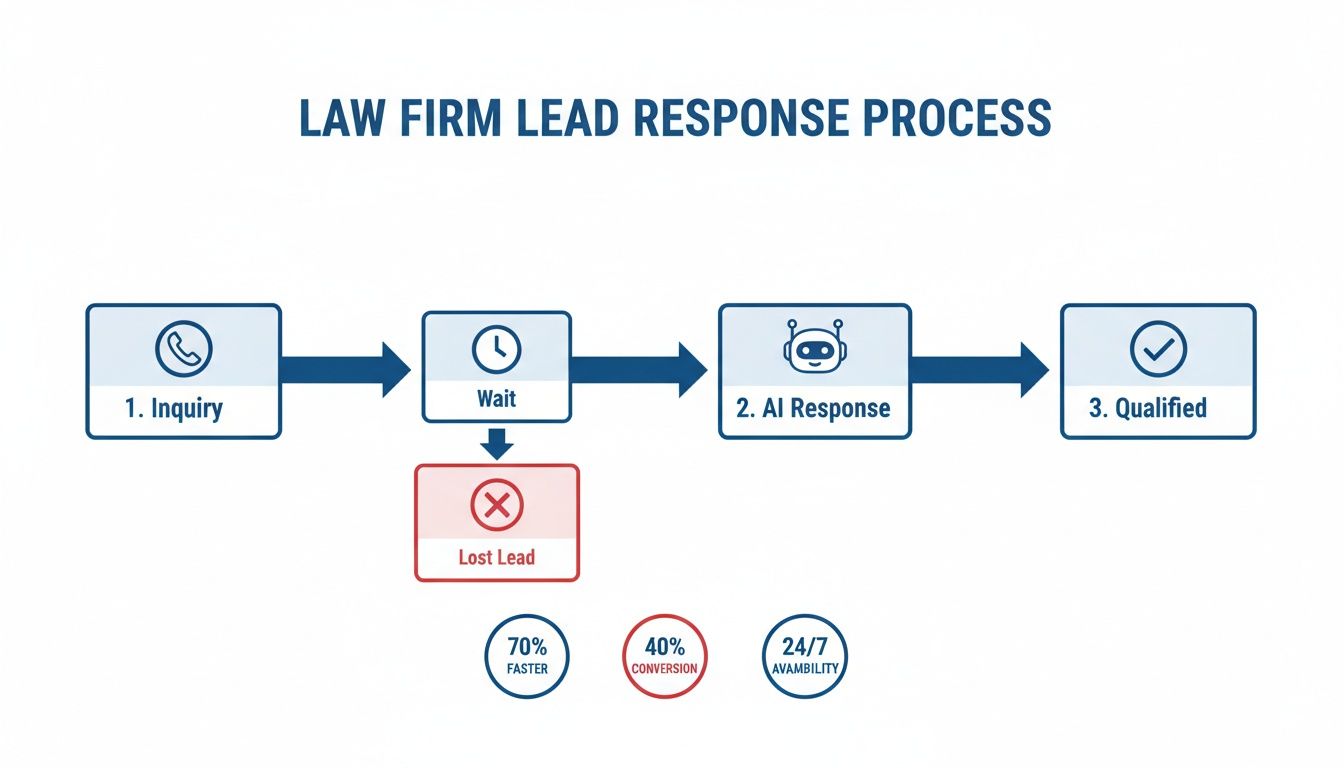
As you can see, the AI completely eliminates that dangerous "wait" period where most leads go cold. It engages, qualifies, and moves people forward immediately.
To make sure you get a system that works, here are the non-negotiables that should be on your evaluation checklist:
-
Seamless CRM and Practice Management Integration
This is a deal-breaker. The AI must talk to your other systems, whether you use Clio, MyCase, Filevine, or another platform. The whole point is to have qualified lead data—names, contact info, case details—pushed automatically and accurately into your firm's database. This kills manual data entry and the costly mistakes that come with it. -
Deep Intake Script Customization
Generic, one-size-fits-all scripts are useless for legal intake. You need total control to build out detailed, conditional conversation flows that mirror your firm's unique qualification process. The AI should be smart enough to ask different follow-up questions based on a person's answers, just like your best human intake specialist would. -
Robust Security and Ethical Compliance
This is absolutely critical. The vendor needs to prove its commitment to data privacy with things like end-to-end encryption. You also must be able to embed clear disclaimers that state the chat doesn't create an attorney-client relationship or constitute legal advice. This is your first line of defense against ethical violations.
Ultimately, picking the right platform isn’t about finding the most advanced tech. It's about finding the right fit for your firm's workflow and your vision for growth. If you start with a clear goal and insist on these core features, you'll find an AI system that becomes one of your most valuable assets.
Weaving AI Into Your Firm's Technology Fabric
An AI lead response system isn't some shiny object you just plug in and forget. Its true power isn't in what it does alone, but how it connects with the technology you already rely on every day. Think of it as the new central hub for your client intake—when it talks to your other systems, magic happens.
Real efficiency comes when data flows automatically from the AI into your core software. This creates a smooth, hands-off workflow where nothing falls through the cracks. The goal is to build a single, reliable source of truth for every potential client. When your AI, CRM, and practice management software are all in sync, you eliminate those dangerous gaps where leads get lost, details are keyed in wrong, or follow-ups are simply forgotten.
How The AI-to-CRM Connection Actually Works
Getting these systems to communicate is more straightforward than it sounds. It all boils down to two key pieces: API keys and field mapping.
An API (Application Programming Interface) key is essentially a secure password that lets two different software platforms talk to each other. Your AI provider and your CRM company will have simple instructions for generating and using these keys. It's like giving them a key to a specific door so they can pass information back and forth.
Once they're connected, you just need to tell the information where to go. That’s field mapping. You're simply matching the data points. For example, you’ll map the "name" field from the AI chat to the "contact name" field in your practice management software.
It plays out like this in practice:
- AI Captures:
Full Name: Jane Doe - Integration Maps To:
Clio Contact Field: First Name: Jane, Last Name: Doe - AI Captures:
Briefly describe your situation: Rear-ended on the highway. - Integration Maps To:
MyCase Matter Description: New PI Lead - MVA. Details: Rear-ended on the highway.
This simple process ensures every detail the AI gathers is instantly organized and stored where it belongs, ready for your team to take action.
This isn't just about saving time. Automated data transfer is a powerful risk management tool. It dramatically cuts down on human error—because one mistyped phone number or email address can mean losing a six-figure case for good.
Many firms use practice management software like Clio, which is built for this kind of integration.

The user interfaces are designed for clarity, so it’s easy to see how a new contact or matter created by an AI fits perfectly into your firm's existing workflow.
A Real-World Integration Scenario
Let's picture a family law firm that uses an AI lead response system for lawyers on its website. They've connected it directly to their CRM.
- A potential client lands on their website at 10 PM and starts a chat about a divorce.
- The AI runs through a pre-set list of qualifying questions, gathering their name, contact info, whether kids are involved, and the spouse's name for a conflict check.
- The moment the chat ends, the integration automatically kicks off a chain reaction:
- A brand new contact record is created in the firm's CRM.
- A "potential matter" is opened and linked to that contact.
- An automated task pops up for a specific paralegal: run a conflict check first thing in the morning.
- The head of the family law department gets an email notification.
By the time the team walks in the next morning, a qualified lead is already in the system, vetted, and assigned for the next step. No manual entry. No risk of it getting buried in an inbox. No delay.
This seamless flow is the hallmark of a properly integrated system. To learn more about how these tools fit into a broader client engagement strategy, read our guide on integrating live chat and chatbots for immediate client engagement.
This isn't just a niche trend; it's rapidly becoming the standard. The data shows that 79% of legal professionals are already using AI. Of those, 63% report better client responsiveness, a direct benefit of these smart integrations. With 82% planning to increase their AI use next year, getting your systems to work together is no longer a luxury—it’s a competitive necessity. You can discover more insights about these legal tech trends to see how they're reshaping the modern law practice.
Designing AI Conversations That Build Trust and Qualify Leads
An AI system is only as good as the script you give it. This is where you stop being a tech implementer and become a conversation designer. The real magic of an AI lead response system for lawyers isn't just speed; it's the ability to have a conversation that is both empathetic and incredibly efficient, turning a cold inquiry into a warm, qualified lead.
Your goal is to build a digital intake specialist that acts just like your best human paralegal or intake coordinator—professional, compassionate, and sharp. It has to ask the right questions to screen for case viability while also making a potential client feel heard during what is often a very stressful time.

Establishing The Right Tone
Before you even think about writing questions, you have to decide on the AI's personality. Should it be formal and direct? Or warm and reassuring? The right answer depends entirely on your practice area and your firm's brand.
A corporate law firm might choose a more buttoned-up, professional tone. A personal injury firm, on the other hand, should absolutely lean into empathy and compassion. This isn't just about word choice; it’s about crafting a consistent persona that aligns with what a potential client expects from their very first interaction with your firm.
Crafting Practice-Specific Intake Questions
Generic questions get you generic, unqualified leads. Simple as that. To actually qualify prospects, your AI's questions need to be specific and tailored to the nuances of each legal area you handle. The first few questions are critical for quickly sorting out whether the inquiry is even in your firm's wheelhouse.
Here are a few examples I've seen work well:
- For a Personal Injury case: "To best understand your situation, could you briefly describe what happened and when the incident occurred?"
- For a Family Law matter: "Thank you for reaching out. To start, are there any children involved in this matter?"
- For a Business Law inquiry: "We can certainly help with that. What is the current legal structure of your company (e.g., LLC, S-Corp, sole proprietorship)?"
These questions are direct, easy for a stressed person to answer, and immediately gather a critical piece of qualifying information. This allows the AI to instantly route the conversation down the correct path or politely decline if it's a practice area you don't handle.
The secret to a great AI conversation is designing it to feel less like an interrogation and more like a guided conversation. Each question should build on the last, creating a natural flow that gently gathers information without overwhelming the user.
Once you have that initial qualifier, you can program follow-up prompts that layer in some empathy and gather more detail. This shows the potential client you're actually listening and that their specific circumstances matter.
Sample AI Intake Prompts By Practice Area
This table shows how you can combine a direct qualifying question with a more compassionate follow-up. It's a simple but powerful technique for building rapport while still getting the information you need.
| Practice Area | Initial Qualifying Question | Follow-up Empathy Prompt |
|---|---|---|
| Personal Injury | "Were you injured as a result of the incident?" | "I'm so sorry to hear that. Your well-being is our top priority. Have you received any medical attention?" |
| Family Law | "Are you and your spouse in general agreement on the major issues, like property and custody?" | "I understand this can be a difficult process. We're here to help guide you through it." |
| Estate Planning | "Do you currently have a will or any estate planning documents in place?" | "That's a great first step. Thinking about these things now provides peace of mind for the future." |
As you can see, this combination creates a much more positive and effective experience for the person reaching out to your firm.
Programming Conditional Logic And Declinations
This is where the real power comes in. Conditional logic is the "if-then" programming that lets the conversation adapt in real-time based on a person's answers.
A perfect use case for this is automated conflict checking. You can program the AI to ask for the name of the opposing party early in the conversation.
- AI: "To ensure we can represent you, could you please provide the full name of the other party involved?"
If the name they provide matches an entry in your firm's conflict database (which can be integrated via your CRM or practice management software), the AI can trigger an automated declination.
Now, this has to be handled with care. A polite, professional script is crucial. It might say something like: "Thank you for providing that information. Unfortunately, due to a conflict of interest, we are unable to assist you with this matter. We wish you the best in finding the right representation."
This simple automated step protects your firm ethically and saves a massive amount of time for both your team and the potential client. By thoughtfully designing these conversational pathways, your AI becomes more than a data collector—it becomes a trusted, efficient, and professional first point of contact for your entire law firm.
Navigating The Ethical Rules Of AI In Legal Intake
For any law firm, bringing in new tech has to be balanced against our unwavering ethical duties. When you set up an AI to handle initial lead responses, risk management isn't just a nice-to-have feature—it’s the entire foundation. Getting this right is about protecting your clients, your reputation, and your license.
The biggest elephant in the room is the Unauthorized Practice of Law (UPL). Your AI, no matter how smart it seems, cannot and should not ever give legal advice. Period. If a potential client thinks they’re getting real legal guidance from a chatbot, your firm is stepping into a serious ethical minefield. The line between gathering facts and giving advice has to be bright, bold, and impossible to miss.
This is where proactive, built-in safeguards are absolutely critical. Your system must have explicit, unmissable disclaimers right at the start of every single conversation.
Key Takeaway: The AI's very first message has to set the stage. Something like, "Hi, I'm an AI assistant here to gather some basic information. Please know that this chat does not create an attorney-client relationship, and nothing I say is legal advice," immediately manages expectations.
Protecting Attorney-Client Privilege
Even before a prospect officially signs on, the information they share is often deeply personal and sensitive. The core principle of attorney-client privilege means we have to treat that data with extreme confidentiality. This duty passes directly to any technology we use.
When you're looking at an AI lead response system for lawyers, data security isn't just a bullet point on a feature list—it's a dealbreaker. You have to do your due diligence and confirm that any vendor you consider has ironclad security measures in place.
Look for these non-negotiable security features:
- End-to-End Encryption: This scrambles the data from the moment a person types it until it lands securely in your system. No one can intercept it in between.
- Secure Data Storage: The vendor must use compliant, secure servers for any data they handle, even if it's just for a few seconds.
- Strict Access Controls: You need total control over which members of your team can view the information the AI collects.
A data breach isn't just a tech problem; it's a profound ethical failure.
A Scenario Of A Potential Pitfall
Let's walk through a common situation. A potential client comes to your website after a car accident and asks your AI, "The insurance company offered me $5,000. Should I accept it?"
An AI that hasn't been properly trained might say something that sounds helpful but is actually dangerous, like, "While I can't give advice, many people in your situation get more."
Even with that little disclaimer, the first half of the sentence could easily be interpreted as legal guidance. That's all it takes to create a massive ethical headache. The AI needs to be programmed to spot these questions and immediately pivot.
Here’s a much safer, pre-scripted response: "That's a really important question, and the answer always depends on the specific details of a case. I am not an attorney and can't provide legal advice, but I can connect you with one of our experienced lawyers for a free consultation to discuss that very issue."
This response does exactly what it should: it deflects the request for advice and funnels the potential client to the only person who can give it—a licensed attorney.
For a more comprehensive breakdown, you can learn more about AI compliance and ethics in legal marketing in our detailed guide. Using AI is a smart move for growth, but building it on a strong ethical framework is what protects your firm’s integrity for the long haul.
Getting your AI system up and running is a great start, but the real magic happens when you commit to making it better over time. If you just "set it and forget it," you're leaving a massive opportunity on the table. Think of your AI as a new member of your intake team—it needs to be coached with data to go from a neat tool to a genuine growth engine for your firm.

The financial upside here is hard to ignore. We see it with our clients all the time: firms that actively measure performance get real results. Heavy AI users report a 69% positive revenue impact and a 63% improvement in client responsiveness. When you track the right metrics, you can draw a straight line from your AI system to these bottom-line gains. It's how you ensure you're getting your piece of the efficiency pie. Thomson Reuters has some great insights on the future of AI in the legal profession if you want to dig deeper.
What KPIs Actually Matter?
Before you can improve anything, you have to measure it. The key is to avoid getting lost in "vanity metrics" and focus on the numbers that directly impact your firm's growth. These KPIs tell the true story of how your AI is performing and exactly where you can tune it up.
Here’s where I’d recommend starting:
- Lead Qualification Rate: This is your north star. What percentage of conversations turn into a lead that actually meets your firm's case criteria? A high rate means the AI is doing its job well.
- Conversation Drop-Off Rate: Where are people giving up? If you see a lot of people bailing after a specific question, that's a red flag. The question might be too complicated, too personal for that early stage, or just poorly worded.
- Cost-Per-Qualified-Lead (CPQL): This is simple but powerful. Take your monthly AI software cost and divide it by the number of qualified leads it produced. Now you know exactly what it costs to get a good potential client through the door.
- Lead-to-Retained-Client Rate: Of all the leads your AI qualified, how many ended up signing a retainer with your firm? This metric connects your AI's performance directly to revenue and proves its true ROI.
Monitoring these numbers lets you stop guessing and start making data-driven decisions. A low qualification rate isn't a sign of failure—it's a clear signal telling you where to refine your intake scripts.
A Simple Way to Test and Improve: A/B Testing
Once you have a baseline from your KPIs, you can begin experimenting. A/B testing sounds technical, but it’s really just a straightforward way to compare two versions of something to see which one works better.
Let's say you're not sure which opening line will connect best with a potential client. You could test two different approaches:
- Version A (Direct): "To get started, please briefly describe your legal issue."
- Version B (Empathetic): "I understand you're going through a difficult time. How can we help you today?"
Run Version A for two weeks and meticulously track your qualification and drop-off rates. Then, switch to Version B for the next two weeks and do the same. Compare the numbers. The data will give you a clear winner, showing what truly resonates with the people reaching out to your firm.
This simple process of testing, measuring, and adjusting is what will ensure your AI lead response system for lawyers delivers the best possible results for years to come.
Common Questions About AI Intake for Law Firms
We get a lot of questions from attorneys who are curious but cautious about bringing AI into their intake process. Let's tackle some of the most common ones.
Will an AI System Replace My Intake Staff?
Not at all. In fact, it's quite the opposite. Think of an AI intake system as a force multiplier for your team, not a replacement.
The AI is there to handle the immediate, 24/7 lead capture and initial qualification. This frees up your skilled intake specialists from chasing down every single inquiry so they can focus their time on what they do best: having meaningful, high-value conversations with potential clients who are actually ready to move forward.
How Much Does a System Like This Cost?
The price can vary quite a bit, typically running from a few hundred to several thousand dollars a month. The final cost really depends on the complexity of the system and the size of your firm.
But the monthly fee isn't the number you should be focused on. The real metric is the return on your investment. Just think about it—how does that monthly cost stack up against the value of landing just one or two major cases you would have otherwise lost simply because a competitor got back to the lead faster?
Can an AI Genuinely Sound Empathetic?
Absolutely. This isn't the robotic, clunky chatbot technology from a few years ago. Modern conversational AI, when set up properly, can be incredibly nuanced and mirror a human-like, empathetic tone.
You're in the driver's seat. You can customize the tone, the specific words it uses, and the entire flow of the conversation. This ensures the AI's voice aligns perfectly with your firm's brand, making a professional and reassuring first impression every single time.
Is Client Data Secure with a Third-Party Tool?
It has to be. This is a deal-breaker, and any reputable legal tech vendor knows it. Security and confidentiality are paramount.
When you're evaluating a provider, don't be shy about asking for proof of their security protocols. You need to see a clear commitment to things like:
- End-to-end encryption
- Secure data storage practices
- Compliance with all relevant data privacy laws
Protecting your clients' information is just as important as protecting your firm's reputation. Make sure any tool you consider takes that as seriously as you do.
At RankWebs, we provide actionable insights and proven frameworks to help law firms navigate changes in legal marketing with results-driven strategies. Find out more about how we help law firms grow.