


AI intake for personal injury law firms is essentially your automated, always-on front desk. It uses smart tools like chatbots and other automated systems to instantly connect with potential clients, collect crucial case details, and filter for the high-value cases you want—all without a staff member having to lift a finger. It ensures you never miss a lead, no matter when they reach out.
Why Top Firms Are Switching to AI Intake

Anyone running a busy PI firm knows the intake process is a classic bottleneck. It's a world of after-hours calls that go to voicemail, delayed follow-ups, and a stretched-thin intake team trying to sift through every inquiry to find the viable cases. This old model doesn't just leave money on the table; it creates a terrible first impression for people who are in a crisis and need help now.
Think about it: a person who’s been seriously injured isn't going to wait. They often decide to call a lawyer late at night or over the weekend. If they hit your voicemail, they’re not leaving a message and patiently waiting for a call back on Monday. They’re hanging up and dialing the next firm on the list. That single missed opportunity is forcing a major change in how firms think about getting new clients.
The Inevitable Move to Automation
The pressure to be available 24/7 is real, but hiring around-the-clock staff is incredibly expensive and, frankly, impractical for most. This is exactly where AI intake for personal injury law firms stops being a futuristic nice-to-have and becomes a competitive must-have. It’s a direct solution to a very real operational headache.
Let's look at how the whole process changes. The table below breaks down the shift from the old, manual way of doing things to a modern, AI-powered approach.
The Shift from Traditional to AI-Powered Intake
| Intake Challenge | The Old Way | The AI Solution |
|---|---|---|
| Availability | Missed calls after 5 PM and on weekends. Leads go cold waiting for a callback. | 24/7/365 availability. Instant engagement via chatbot or web form the moment a person reaches out. |
| Response Time | Hours or even days. The lead may have already hired another firm. | Seconds. An AI-powered system responds immediately, capturing the lead's attention. |
| Qualification | Intake specialists manually ask screening questions, which can be inconsistent. | Systematic qualification. Asks the same critical questions every time, based on your firm's exact criteria. |
| Staff Workload | Team members spend hours on non-viable inquiries, leading to burnout and distraction. | Automated screening. The AI filters out unqualified leads, so your team only talks to high-potential clients. |
| Client Experience | A potential client in distress is met with a voicemail or a busy signal. Frustrating. | Empathetic and efficient. A well-designed AI provides a smooth, reassuring, and immediate first touchpoint. |
This isn't just theory; it's a real-world pivot happening right now. Personal injury firms are actually ahead of the curve here. Recent industry data shows that 37% of personal injury professionals are already using generative AI, which outpaces the average lawyer's adoption rate of 31%. The firms that have made the switch are seeing the payoff, with 61% anticipating a boost in productivity and 44% expecting to see significant cost savings. You can get a deeper look at these AI adoption insights in personal injury law.
By automating the very top of your client funnel, you ensure every single lead is captured and vetted. This frees up your paralegals, intake specialists, and attorneys to do what they're best at: building relationships with qualified clients and winning their cases.
How to Choose the Right AI Intake Partner
Picking an AI intake vendor isn't just about watching a slick demo. You’re choosing a technology partner that will become the very first touchpoint for your future clients. Get this wrong, and you could end up with a clunky system that causes more headaches—from data leaks to a frustrating client experience—than it solves.
The market is crowded, and you’ll see everything from generic chatbots to sophisticated AI built specifically for law firms. For personal injury, a one-size-fits-all solution is a non-starter. Your intake requires a level of empathy, nuance, and legal know-how that a basic bot just can't deliver.
Beyond the Sales Pitch
You have to look past the marketing fluff. A sales team is paid to show you the highlights, but it’s your job to probe for the deal-breakers. This means getting specific and asking the tough questions that will really determine if the platform is a good fit for your firm.
I've seen firms get this wrong, and it always comes down to three things: a messy integration with their existing software, weak data security, or a lack of customization that reflects how they actually evaluate cases. If a vendor can't deliver on these three pillars, even the most advanced AI is just an expensive gadget.
Integration with Your Case Management Software
Let's be blunt: an AI tool that doesn't talk to your other systems is just creating more work. The whole point of AI intake for personal injury law firms is to make your life easier, not to add another data entry task to your team's plate.
So, the very first question you should ask is about its connection to your Case Management Software (CMS). Before you even agree to a demo, find out if they offer a direct, native integration with your platform, whether that’s Clio, Filevine, CasePeer, or something else.
A properly integrated system should be able to automatically create a new case file in your CMS, populate it with all the details from the intake conversation, and even assign a follow-up task to a paralegal—all without anyone on your staff having to lift a finger.
If there’s no native integration, you need to dig into their API capabilities or their ability to work with tools like Zapier. Be very suspicious of any vendor who gets vague here. A clunky, patchwork integration will kill your ROI.
Security and Ethical Compliance
In personal injury law, you're dealing with incredibly sensitive client data, including protected health information (PHI). This makes your AI partner's security protocols a non-negotiable. You have a legal and ethical duty to protect this information, and a breach would be a disaster for your clients and your firm's reputation.
You need to grill them on their security. Ask them directly:
- Is your platform HIPAA compliant? The answer must be a definitive "yes." Don't just take their word for it; ask to see their Business Associate Agreement (BAA).
- Where is our data stored, and who owns it? It’s your data. It should be stored securely in your region, and the vendor should never, ever use it to train their other AI models.
- What are your data encryption standards? You’re looking for end-to-end encryption for data both in transit and at rest. No excuses.
- What is your guaranteed uptime? An intake system that's down is worse than an unanswered phone. Push for a Service Level Agreement (SLA) that guarantees 99.9% uptime or better.
Customization and AI Model Transparency
Finally, the AI has to bend to your will, not the other way around. Every firm has unique case criteria. The AI must be trained to ask the right questions to flag the high-value cases you want while gently turning away the ones that aren’t a good fit. This requires far more than basic logic trees.
Here’s what to ask the vendor:
- How much can we customize the conversation flows and the logic for qualifying a case?
- Can the AI handle tricky situations, like multi-car accidents or questions about complex liability?
- What specific AI model does your platform run on, and how was it trained for legal intake?
There's a world of difference between a generic language model and one that's been fine-tuned on actual legal data. A specialized model is far more adept at understanding legal jargon and the nuances of a potential client's story. It's also a critical piece of more advanced strategies, like those we cover in our guide to AI-powered lead scoring for attorneys, which helps your team focus on the leads most likely to become great cases.
Choosing a partner that delivers a robust, secure, and truly customizable platform is what sets your firm up for real growth.
Designing an Intake Workflow That Converts
Picking the right AI partner is a huge first step, but it’s just that—a first step. The real breakthrough comes when you build an intelligent workflow that takes a potential client from a tentative first message all the way to a signed retainer. This isn't about slapping a generic chatbot on your website. It's about engineering a system that signs clients with both efficiency and empathy.
Think of your workflow as your firm’s digital handshake. It has to gather the crucial details for evaluating a case—whether it’s a car wreck, a slip and fall, or medical malpractice—without making an injured person feel like they're just filling out a form. The goal is a smooth, conversational experience that builds trust from the very first click.
Mapping the Ideal Client Journey
Before you even think about writing a prompt, grab a pen and paper (or a whiteboard) and map out your ideal intake journey. What information do you absolutely need to decide if a case is worth pursuing? Break it down into stages, starting with broad questions and getting more specific as you go.
This simple exercise will show you exactly where AI automation will make the biggest difference. For example, AI is perfect for that initial screening, but you’ll probably want to set a rule that immediately hands off high-value cases or those involving catastrophic injuries to a live person.
A solid journey map usually includes these touchpoints:
- Initial Contact: The AI should greet the user, show genuine empathy for their situation, and explain that it's there to gather some basic information to see how the firm can help.
- Case Type Identification: The workflow needs to quickly figure out what kind of injury claim it's dealing with (e.g., auto accident, workplace injury, premises liability).
- Key Fact Gathering: This is where the AI asks smart, targeted questions based on the case type. Think date of the incident, location, and a short description of what happened.
- Qualification & Triage: Using rules you’ve set, the AI reviews the answers against your firm's criteria and decides what to do next.
Your AI workflow should feel less like an interrogation and more like a guided conversation with a highly competent assistant. Every question should have a clear purpose tied directly to case qualification.
The impact of a well-designed workflow is both significant and fast. The 2025 Legal Injury Report revealed that 47% of small PI firms (fewer than 10 attorneys) saw efficiency gains from AI in under six months. What's more, 74% of all PI firms using AI reported better internal processes and staff productivity—and that all starts with a smarter, automated intake.
Setting Smart Qualification Rules
This is where you translate your firm’s strategy into action. Qualification rules are the "if-this-then-that" logic that gives your AI its brain. You need to program the system with the same criteria your best intake specialist uses, essentially turning your firm's hard-won experience into an automated process.
But before you can build those rules, you need the right technology partner—one that allows for deep customization, provides top-notch security, and integrates smoothly with your other systems.
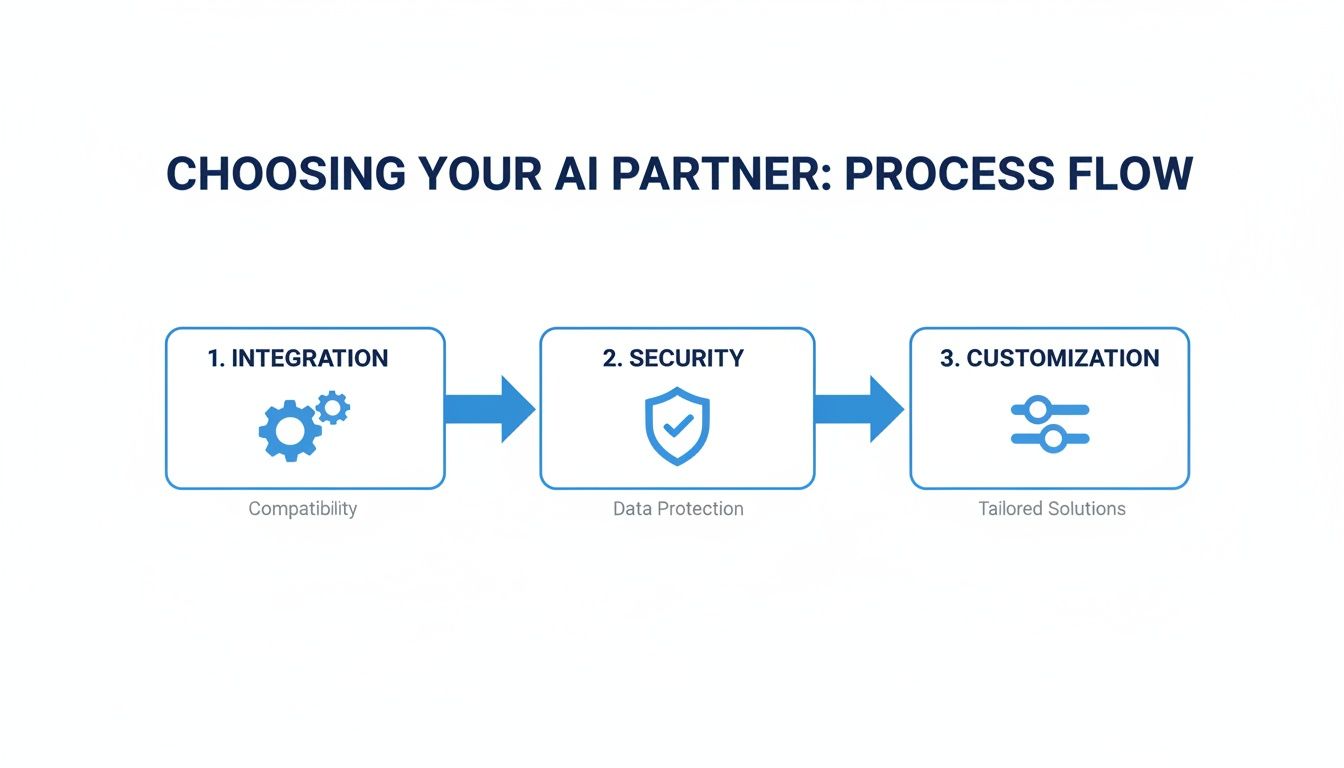
This process shows that finding the right vendor is the foundation. Only then can you build an effective workflow powered by strong qualification rules.
Here are a few real-world examples of rules you can build into your AI intake for personal injury law firms:
- Statute of Limitations Flag: If the incident date falls outside your state's statute of limitations, the AI can be programmed to politely explain the situation and automatically decline the case. This saves everyone time.
- Injury Severity Trigger: For inquiries that mention keywords like "surgery," "hospitalization," or "permanent disability," the AI can instantly flag the lead as high-priority and shoot an alert to an attorney for immediate review.
- Geographic Filtering: If your firm is only licensed in certain states, the AI can ask for the incident location right away and gracefully filter out any inquiries from outside your jurisdiction.
Automating the Critical Next Steps
Once your AI has qualified (or disqualified) a lead, the job isn’t done. The final piece is automating the right follow-up action. This seamless handoff is what separates a decent system from a great one, ensuring no promising lead ever goes cold.
For qualified leads, the possibilities are powerful:
- Automatic Calendar Scheduling: The AI can offer a direct link for the person to book a consultation on an attorney's calendar.
- Digital Retainer Delivery: For straightforward cases that tick all the boxes, the system could even send a retainer agreement for e-signature through a service like DocuSign.
- Instant Human Handoff: For a hot lead, the AI can transfer the chat in real-time to a live intake specialist who can take over and close the deal.
Automating these next steps is non-negotiable. You can get a much deeper look into the specifics of automating client follow-up with AI in our dedicated guide. By keeping the momentum going after that first conversation, you’ll see a dramatic increase in your conversion rates.
Integrating AI with Your Case Management Software
Let's be clear: an AI intake tool that operates in a silo isn't a solution; it's just another problem. It creates islands of data that force your team right back into the manual work you’re trying to escape—copying, pasting, and double-checking information between systems.
The real power of AI intake for personal injury law firms is only unlocked when it talks directly to your firm's Case Management Software (CMS). This is non-negotiable.
This connection is what turns a neat chatbot into a core part of your firm’s operational engine. The goal is a seamless, automated flow of information, from the very first chat message straight into a new client matter. This is where you'll see the real ROI, as it crushes the potential for human error and dramatically shortens the time it takes to get a new client signed.
Understanding Your Integration Options
Connecting your new AI tool to your CMS probably sounds more complicated than it is. Most vendors who are serious about the legal space know this is a critical feature and have a few standard ways to make it happen.
Your choice really depends on your firm's technical comfort level and your specific CMS. You'll typically run into two main paths:
- Native Integrations: This is the gold standard. A native integration is a pre-built, plug-and-play connection between the AI vendor and a major CMS like Clio, Filevine, or CasePeer. It’s by far the easiest to set up and the most reliable.
- Third-Party Connectors: Tools like Zapier act as a bridge when a native connection isn't available. They use simple "if this happens, then do that" logic to push data from your AI intake tool into your CMS. This method offers a lot of flexibility but might take a bit more time to configure correctly.
Don’t compromise on this. When you’re sitting through a vendor demo, one of your first questions should be, "Do you have a direct, native integration with our CMS?" If you get a vague answer, that’s a major red flag.
What to Look for in an Integration
When evaluating how an AI tool will connect to your CMS, you need to look beyond a simple "yes, we integrate." A good integration is about a deep, two-way data flow that makes your firm smarter and more efficient.
Here's a checklist of the integration capabilities you should demand from any AI intake tool for your practice.
Essential AI Integration Features for PI Law Firms
| Feature | Why It Matters | Real-World Example |
|---|---|---|
| Automatic Matter Creation | Eliminates manual data entry and ensures no lead falls through the cracks. | A qualified lead from the AI chatbot automatically creates a new "MVA – John Doe" case in your CMS. |
| Contact Syncing | Keeps client contact information consistent across all platforms, preventing errors. | When a potential client updates their phone number via chat, it automatically updates their contact record in your CMS. |
| Field Mapping | Ensures data goes exactly where it belongs, populating case details accurately. | The "Date of Incident" from the AI intake form populates the corresponding custom field in your CMS matter. |
| Task & Event Creation | Automates follow-up and keeps the intake process moving forward without delay. | The AI qualifying a lead automatically assigns a task to a paralegal: "Call Jane Smith for consultation." |
| Document Upload | Allows potential clients to upload photos or documents that are saved directly to their new case file. | A user uploads photos of their car damage, and they appear instantly in the "Documents" tab of their matter in your CMS. |
A robust integration that ticks these boxes is what separates a gimmick from a genuine operational upgrade.
A Real-World Integration Scenario
Let's walk through what this actually looks like. Imagine a potential client, Sarah, who was hurt in a slip-and-fall. She finds your firm’s website at 10 PM on a Tuesday, long after your team has gone home.
- Initial Chatbot Interaction: Sarah starts a chat. The AI asks empathetic, qualifying questions: where and when the accident happened, the nature of her injuries, and whether she received medical care.
- Automated Qualification: Based on the rules you’ve set, the AI confirms Sarah's case meets your firm’s criteria. The incident is recent, the injuries are significant, and it’s in your jurisdiction.
- The Integration Trigger: The moment the AI qualifies the lead, it triggers the integration with your CMS. This is the magic.
- Automatic Case Creation: Instantly, a new matter is created in your system: "Sarah – Slip and Fall."
- Data Population: All the information Sarah just provided—her name, phone number, accident details, injury notes—is automatically and accurately populated into the correct fields within the new matter.
- Task Assignment: The system then automatically assigns a task to a specific paralegal to "Call Sarah for a detailed follow-up consultation," with a due date of the very next morning.
This entire sequence takes just a few seconds.
By the time your team walks into the office, a qualified, vetted lead is already sitting in your system with a clear next step assigned. No one had to manually type in a name, there’s no risk of a typo in an email address, and there was zero delay in moving the case forward. This is how top firms consistently get ahead.
Getting Your Team Onboard with AI
Bringing in a new AI intake system isn't just a tech project; it’s a people project. I've seen firms invest in the most sophisticated software only to have it collect dust because the team saw it as a threat, not a tool. Your real challenge isn't the integration—it's getting your people, from the front-line intake specialists to the senior partners, to actually use and trust the new system.
Let's be direct: the biggest hurdle you'll face is fear. When people hear "automation," they immediately think "job replacement." Your first move has to be tackling this head-on. This isn't about replacing your team; it's about replacing the mind-numbing, repetitive tasks that burn them out. Frame the AI as an assistant, a powerful new team member designed to make their jobs less tedious and more meaningful.
Shifting from Screeners to Strategists
With AI, your intake specialists are no longer just call screeners. Think about it. The AI can handle the initial, repetitive questions, freeing up your team to do what they do best: connect with people. Their role evolves. They become the warm, human touchpoint for high-value leads that the AI has already pre-qualified.
This change means you need to re-think their training. Instead of drilling them on a rigid script of screening questions, you'll be training them on higher-level skills.
Here’s what that looks like in practice:
- Reviewing AI-Qualified Leads: Teach them to quickly scan an AI-generated summary and get the full picture of a potential case in seconds.
- Knowing When to Step In: You need clear rules for when a human takes over. For instance, any mention of a catastrophic injury, a wrongful death, or a tricky liability situation should immediately trigger a handoff to a live person.
- Building Real Client Rapport: Since they aren't bogged down by a flood of unqualified calls, they can invest more time building trust and showing empathy to the clients you actually want to sign.
The real goal here is to shift your intake team from administrative gatekeepers to strategic client relationship builders. The AI handles the "what," freeing up your team to focus on the "why"—why your firm is the right choice to help.
Fostering Trust in the Technology
Your team isn’t going to lean on the AI if they don’t trust what it's telling them. A healthy dose of skepticism is expected, and frankly, a good thing. The best way to build that trust is with total transparency and hands-on practice.
Walk them through the AI’s logic. Show them the exact rules and criteria you’ve programmed based on your firm's ideal case profile. Don't just tell them it works; show them.
Run some role-playing sessions. Have your intake specialists pretend to be potential clients and interact with the AI intake for personal injury law firms. Let them try to trick it. Then, on the other side, show them how their conversation was instantly captured and how a new client file was perfectly created in your case management software. Seeing it work flawlessly is what turns skeptics into believers.
It's also critical to be realistic. This AI is a powerful assistant, not a perfect attorney. Make it clear that human judgment is, and always will be, the final authority. The AI flags the promising leads, but it's your paralegals and attorneys who make the final call on signing a case. This "human-in-the-loop" model ensures your staff remains in control, making it clear that their expertise is more valuable, not less. By framing AI as a tool that amplifies their skills, you'll build a team of advocates who are genuinely excited about the change.
Measuring the ROI of Your AI Intake System
Any tech investment is only as good as the results it brings in. Just launching an AI intake for personal injury law firms and hoping for the best isn't a strategy. You have to measure its impact to know if the cost is justified and to figure out how to make it even better. This is about moving from a "gut feeling" to hard data, which is what separates the firms getting a real return from those who just bought another piece of software.
The good news? Tracking your return on investment (ROI) doesn't have to be complicated. It really comes down to identifying a few key performance indicators (KPIs) that give you a direct pulse on the health of your intake process. These numbers give you a clear, unbiased look at what's working and what isn't.
Key Performance Indicators to Monitor
To get a real sense of performance, you need to zero in on a handful of high-impact metrics. These KPIs tell the story of your AI's efficiency, how good it is at spotting quality leads, and what it’s actually doing for your firm's bottom line.
Here are the critical numbers you should have on your dashboard:
- Lead-to-Signed-Case Conversion Rate: This is the big one. It tells you what percentage of people who interact with your AI actually end up signing on as clients. If this number goes up, it’s a direct sign that your lead quality and follow-up speed are improving.
- Cost Per Acquisition (CPA): Take a hard look at what you’re spending on marketing to land a single signed case. By having AI handle the initial screening and weed out the non-starters, your CPA should drop. Your team’s time is valuable, and AI ensures they’re only spending it on people who have a real case.
- Intake Qualification Accuracy: How often does the AI get it right? This metric tracks the percentage of leads the AI flags as "qualified" that your human team agrees are viable. A high accuracy rate means your rules are dialed in and your team can trust the system.
From Data to Decisions
Once you have this data flowing in, the real work begins: using it to make smarter decisions.
Let's say you notice a lot of people are dropping out of the chatbot conversation when it asks about the date of their accident. That’s not just a random event; it's a signal. It's time to dive into the conversation logs, figure out what the friction is, and maybe rephrase the question to be a bit clearer or more empathetic.
An AI intake system isn't a "set it and forget it" tool. Think of it as a dynamic part of your firm that needs regular check-ups and tweaks. The data it generates is your roadmap for making it better every single month.
This proactive approach is already paying dividends for firms that jumped in early. While overall AI adoption in personal injury is at 20%, that number puts PI firms ahead of many other practice areas. The Federal Bar Association's Legal Industry Report 2025 shows PI is tied with family law, well ahead of trusts/estates and criminal law.
Why the enthusiasm? The expectations are high, with 61% of PI firms anticipating significant productivity gains. And the results are there to back it up. Data shows that 73% of legal professionals using AI are completing key documents faster, a workflow improvement that starts the moment a new client reaches out. By measuring what matters, you’re not just buying technology—you’re ensuring it delivers a clear, positive return.
Common Questions About AI Legal Intake
Bringing any new technology into a law firm is bound to raise some tough questions. I hear them all the time from personal injury attorneys. When you're dealing with strict ethical duties and client confidentiality, you have to be careful. Let's break down the most common concerns I see firms grappling with.
Is Client Data Safe with an AI Intake System?
This is the big one, and for good reason—protecting client confidentiality is everything. Any reputable AI vendor serving the legal space knows this and builds their platform with security as a top priority.
You should be looking for systems that have end-to-end encryption and are HIPAA compliant. This isn't optional, especially since you're handling sensitive protected health information (PHI) right from the start.
Here's a critical point: Always ask a potential vendor who owns the data. Your firm's data and your clients' stories should never, ever be used to train some larger, external AI model. Make sure the platform you choose operates in a completely closed and secure environment.
How Does AI Intake Align with Ethical Duties?
Ethical compliance is another huge hurdle. The simplest way to think about it is that AI is a tool to support your team, not replace a lawyer's professional judgment. The American Bar Association and state bars are releasing more guidance on this, but at the end of the day, the supervising attorney is still responsible.
The gold standard here is what we call a "human-in-the-loop" model. Let the AI do the initial screening, qualification, and information gathering. But the final call on whether to take a case? That must always come from a qualified legal professional. This approach ensures you meet your duty of competence and that every potential client gets the expert review they deserve.
If you want to dig deeper into this topic, our guide on AI compliance and ethics in legal marketing is a great resource for keeping your firm on the right side of the rules.
What Is the Real Cost and Is It Worth It?
Of course, it always comes down to the investment. The cost of AI intake for personal injury law firms can vary, but the real conversation should be about the return.
Think about it this way: what's the cost of one good case that you missed because the call came in at 10 PM on a Friday? Or how many hours does your team waste each month talking to people whose cases you could never take?
An AI system handles that initial screening 24/7, which lowers your cost to acquire a good case and frees up your paralegals for work that actually moves cases forward. For most firms I've seen, the system pays for itself surprisingly fast, just by capturing more qualified leads and making the whole intake process more efficient.
At RankWebs, we provide actionable insights and proven frameworks to help your law firm navigate technological changes and achieve sustainable growth. Explore our resources at https://rankwebs.com.