


Is AI intake automation just another piece of shiny tech or a serious investment for your firm?
Let's cut through the hype. AI intake automation is simply smart software designed to handle the first point of contact with a potential new client. It does everything from capturing lead information on your website at midnight to scheduling initial consultations automatically. It’s a tool that slashes response times and makes sure no potential client ever hits voicemail or waits days for a callback—a fix that directly impacts your bottom line.
Why AI Intake Is a Game-Changer for Law Firm Growth
Every missed call is a client you just sent to your competitor. It’s that simple. In the legal field, the speed and professionalism of that first interaction often decide whether a prospect signs with you or the firm down the street. This is where AI intake automation proves its worth. It’s not about replacing your intake specialists; it’s about giving them superpowers so your firm can run at peak efficiency, 24/7.
By automating the routine, repetitive tasks of the intake process, you solve a few massive operational headaches at once. You kill the bottleneck of manual data entry, you guarantee every single lead is captured no matter when they reach out, and you free up your best people to have high-value conversations with qualified prospects. Suddenly, your intake process shifts from a reactive administrative chore into a proactive engine for signing new clients.

From Cost Center to Revenue Driver
For years, intake has been seen as a necessary cost of doing business. AI completely flips that script. Instead of just being an administrative function that drains resources, an automated system becomes a direct contributor to your revenue. How? By making sure those marketing dollars you’re spending to make the phone ring (or the contact form ping) are never, ever wasted.
Think about these immediate improvements to your operations:
- 24/7 Availability: You can now capture leads from your website, social media, or even text messages at 2 AM on a Saturday, a time when your office is dark but a potential client is wide awake and desperately needs help.
- Instant Engagement: Every single person who visits your website is greeted by an intelligent chatbot that can answer basic questions, gather the essential details of their case, and get a consultation on the calendar—all in real-time.
- Automated Qualification: The system uses rules you define to screen inquiries on the spot. It can identify the high-value cases you want and flag them for immediate follow-up from your team.
"The core benefit of AI intake automation is converting potential into tangible opportunity. It bridges the gap between a prospect's initial inquiry and a meaningful conversation with your legal team, ensuring that gap is measured in seconds, not hours or days."
This instant, consistent engagement drastically improves the client's experience from the very first touchpoint. It builds trust and shows a level of responsiveness that immediately sets your firm apart from the competition.
To see the difference in black and white, here’s a quick comparison of a typical firm’s workflow before and after bringing in AI.
Before and After AI Intake Automation: A Snapshot
| Metric | Traditional Intake Process | With AI Intake Automation |
|---|---|---|
| Lead Capture | Missed calls/emails after hours; manual data entry from forms. | 24/7 automated capture from all channels (web, chat, SMS, phone). |
| Response Time | Hours or even days, dependent on staff availability. | Instantaneous, typically within 5 seconds. |
| Qualification | Staff time spent on every inquiry, qualified or not. | Automated pre-screening based on pre-set criteria. |
| Staff Focus | Repetitive data entry and scheduling tasks. | High-value conversations with pre-qualified leads. |
| Client Experience | Inconsistent; long wait times can lead to frustration. | Consistent, professional, and immediate engagement. |
| Data & Insights | Manual tracking, often incomplete or inconsistent. | Real-time dashboards on lead sources, conversion rates, and bottlenecks. |
As the table shows, this isn't just a minor tweak—it's a fundamental operational upgrade that touches every part of your client acquisition process.
The Measurable Return on Investment
The impact here isn't just a feeling; it's backed by hard numbers. Firms that implement AI-powered intake systems often see a 3–5x return on investment within the first six months.
This ROI is fueled by a few powerful factors, including a sharp drop in average response time by around 40%. Research consistently shows that prospects who are engaged within five minutes of their initial outreach convert at rates up to seven times higher than those who have to wait just 30 minutes. That speed gives you a massive competitive advantage.
You can explore more insights about the ROI of AI intake automation for law firms to see how this operational edge directly translates into more retained clients and higher revenue. At the end of the day, AI intake isn't an expense—it’s a strategic investment that pays for itself by capturing the revenue you were unknowingly letting slip away.
Pinpointing Your Firm’s Biggest Intake Bottlenecks
Jumping into AI intake automation without a clear plan is a lot like buying expensive gym equipment and just hoping for the best. You might feel like you're doing something, but you won't see results where they actually matter. Before you even think about looking at software, you have to do a brutally honest audit of how your firm handles intake right now. The whole point is to find the exact friction points that are costing you time, money, and most importantly, potential clients.
This isn't about pointing fingers. It's about finding opportunities. Start by walking through the entire journey a potential client takes, from their first "I need a lawyer" Google search to the moment they sign your retainer. Every single step along that path is a place where a good lead can fall through the cracks.
Mapping the Client Journey and Asking the Hard Questions
To find your firm’s weak spots, get your team in a room—your paralegals, intake specialists, anyone who has a hand in bringing in new business. You need to ask some very direct questions and push for real answers, not just "we're pretty fast." Your team is on the front lines; they know exactly where the holdups are.
Break down your process and look for the snags:
- First Contact: How long does it really take to respond to a new web form? A voicemail left after 5 PM? If it’s more than five minutes, you’re losing. Be honest with yourselves.
- Data Entry: What chunk of your team’s day is eaten up by manually copying and pasting client info from an email into your case management system? That's a huge, flashing sign for an automation win.
- Lead Qualification: How many hours a week are wasted on the phone with people who are never going to be a good fit for your practice? Every minute spent with a tire-kicker is a minute you're not spending with a perfect, high-value client.
- The Follow-Up Black Hole: Where do people disappear? Is it after the first call? When you ask them to send over documents? Nailing down that drop-off point is gold.
A common blind spot is thinking your intake process is faster than it really is. Time it. Have someone submit a test lead and track it from start to finish. The results are often a tough pill to swallow, but they're the wake-up call you need to make a change.
This whole exercise is about zeroing in on the specific pain points where AI intake automation will give you the biggest bang for your buck.
Turning Problems into a Plan
Once you've done this, your bottlenecks will be impossible to ignore. Maybe you'll find that 30% of your web leads that arrive after 6 PM never get a response. Or you might realize your intake team spends half their day playing calendar Tetris just to schedule initial consults. These aren't just headaches; they're measurable, fixable problems.
Think about this all-too-common scenario: A potential personal injury client fills out your website contact form at 8 PM on a Friday. With a manual process, that lead just sits there until Monday morning. By then, that person has already spoken to three other firms that had an AI chatbot respond instantly and schedule a call. You never even got to the plate.
Or consider the soul-crushing drag of data entry. Your specialist takes information from an email, types it into your CRM, and then types it again to open a new matter in your practice management software. That's not just slow—it's a breeding ground for typos and errors that can cause real headaches later on.
The insights you pull from this audit become the foundation of your automation strategy. You won't be buying tech just to have it. You'll be deploying a specific tool to solve a specific business problem, ensuring your investment in AI intake automation directly fuels your firm's growth by capturing more leads and letting your team focus on what humans do best: building relationships with new clients.
Choosing the Right AI Tools for Your Law Firm
Once you've pinpointed exactly where your intake process is breaking down, it's time to build your technology stack. This isn’t about grabbing the trendiest AI gadget; it's about strategically selecting tools that work together to solve the specific problems you just uncovered. The goal is to design an architecture that’s a perfect fit for your practice area, firm size, and budget.
The core of any modern intake system is built on a few key components. Think of them less as individual pieces of software and more as an interconnected ecosystem that will transform your manual process into a client-capturing machine.
The Building Blocks of an AI Intake System
A truly effective AI intake system combines several technologies, each with a specific job to do. A solo practitioner might start with just one or two, while a larger firm will likely weave together a more complex setup.
-
Intelligent Chatbots: These are your 24/7 digital receptionists. Stationed on your website, they engage visitors instantly, answer common questions, and qualify leads using conversational logic. The best ones use natural language processing, so they feel more like a helpful person and less like a clunky robot.
-
Dynamic Web Forms: These are a huge leap beyond the basic "contact us" box. Using conditional logic, they adapt in real time to a potential client's answers. For instance, if someone selects "Personal Injury," the form can immediately ask for the date and location of the incident—details a "Family Law" lead wouldn’t need to provide.
-
Automated Scheduling Tools: This one is a game-changer. A simple scheduling tool can eliminate the endless email tag that kills so many potential client relationships. They sync directly with your attorneys' calendars, allowing qualified leads to book a consultation right then and there.
-
Legal CRM (Client Relationship Management): This is mission control for all your leads. A solid legal CRM tracks every single interaction, triggers automated follow-up emails, and gives you the data you need to see where your best cases are actually coming from.
The magic isn't in any single tool, but in how they all talk to each other. A great system is one where a chatbot captures a lead, that data populates a dynamic form, the client schedules a meeting, and everything is logged in your CRM without a single person lifting a finger.
We're seeing a major shift in AI adoption across the legal field, though some firms are moving faster than others. By 2025, industry surveys predict widespread AI use for tasks like drafting correspondence (54% of respondents) and analyzing firm performance (47%). Firm size plays a big role, too—39% of firms with over 50 lawyers are using generative AI, compared to just 20% of smaller firms.
Interestingly, this data shows a clear link between intake automation's value and certain practice areas, like civil litigation (27% adoption) and personal injury (around 20%), which are constantly managing a high volume of inquiries. For a closer look, you can find in-depth legal industry survey data that breaks down these trends.
Integration with Your Practice Management Software
This part is non-negotiable: your new tools must play nicely with your existing systems. Your Practice Management Software (PMS)—whether it's Clio, MyCase, or another platform—is the operational heart of your firm. Any new intake tool has to integrate with it flawlessly.
A disconnected system just creates more work, defeating the whole purpose. The goal is a seamless flow of information, where data from your intake tools automatically creates a new matter or client file in your PMS. No manual data entry, no typos, and no wasted administrative hours.
Here's an example of what that central hub often looks like inside a platform like Clio.
This dashboard view is exactly why seamless integration is so critical. It brings all your client and case information into one accessible place, which is precisely what your automated intake system should feed into.
Security and Compliance Are Everything
For law firms, data security isn't just a "nice-to-have" feature—it's an ethical and legal mandate. As you evaluate any AI intake automation tool, security and compliance have to be at the very top of your checklist.
Zero in on vendors that provide:
- End-to-End Encryption: All client data must be encrypted, both when it's being sent and when it's being stored.
- Compliance Certifications: Depending on your practice, you may need tools that are HIPAA compliant (a must for personal injury or disability law) or meet other strict data privacy standards.
- Clear Data Ownership Policies: You own your client data, period. Read the terms of service carefully to make sure the vendor agrees.
Making the right decision means looking past the flashy marketing. To go deeper, check out our comprehensive guide on the best AI tools for law firms to compare different platforms on these crucial points. Always prioritize tools built with the legal industry's unique security obligations in mind. It's about protecting your clients, and ultimately, protecting your firm.
2. Design Workflows That Actually Build Client Trust
An AI intake system is only as good as the human logic you build into it. Let's be honest: a poorly designed workflow feels cold and robotic, and it will absolutely push potential clients away. But when you get it right, the experience can build instant trust, making a prospect feel heard and valued from the very first click.
This is where you translate your firm’s unique intake philosophy into a smart, conversational flow. The goal is to create something that’s not just efficient for your team, but genuinely empathetic and helpful for the person on the other end.
Map Out Your Conversational Logic
Think of your automated workflow as a digital conversation. It needs a clear beginning, middle, and end, guiding someone from their initial problem to a clear next step. It’s essentially a decision tree where each question opens up a specific, logical path.
Start by mapping out your most common intake scenarios. For a personal injury firm, the first few questions are absolutely critical for qualification.
- The Opener: "Were you involved in an accident where you sustained an injury?" This is a simple yes/no that gets the ball rolling.
- The Details: If they say yes, the AI can follow up with, "Could you briefly describe the type of incident? (e.g., car accident, slip and fall)"
- The Timeline: "When did the incident occur?" This is a non-negotiable question to screen for statute of limitations issues right away.
- Medical Treatment: "Have you seen a doctor or gone to the hospital for your injuries?" Their answer helps you gauge the case's severity and level of documentation.
Based on these answers, the system can immediately start segmenting leads. A recent accident with significant injuries is a red-hot lead. An incident from five years ago with no medical treatment? That’s likely not a fit.
Here's a pro tip: Ask the absolute minimum number of questions needed to make that first call. An automated intake that feels like a 20-page questionnaire will kill your conversion rate. Keep it concise, respectful, and laser-focused.
This flowchart gives you a great visual for how to think through this process, especially when you're deciding on the right tools for your firm.
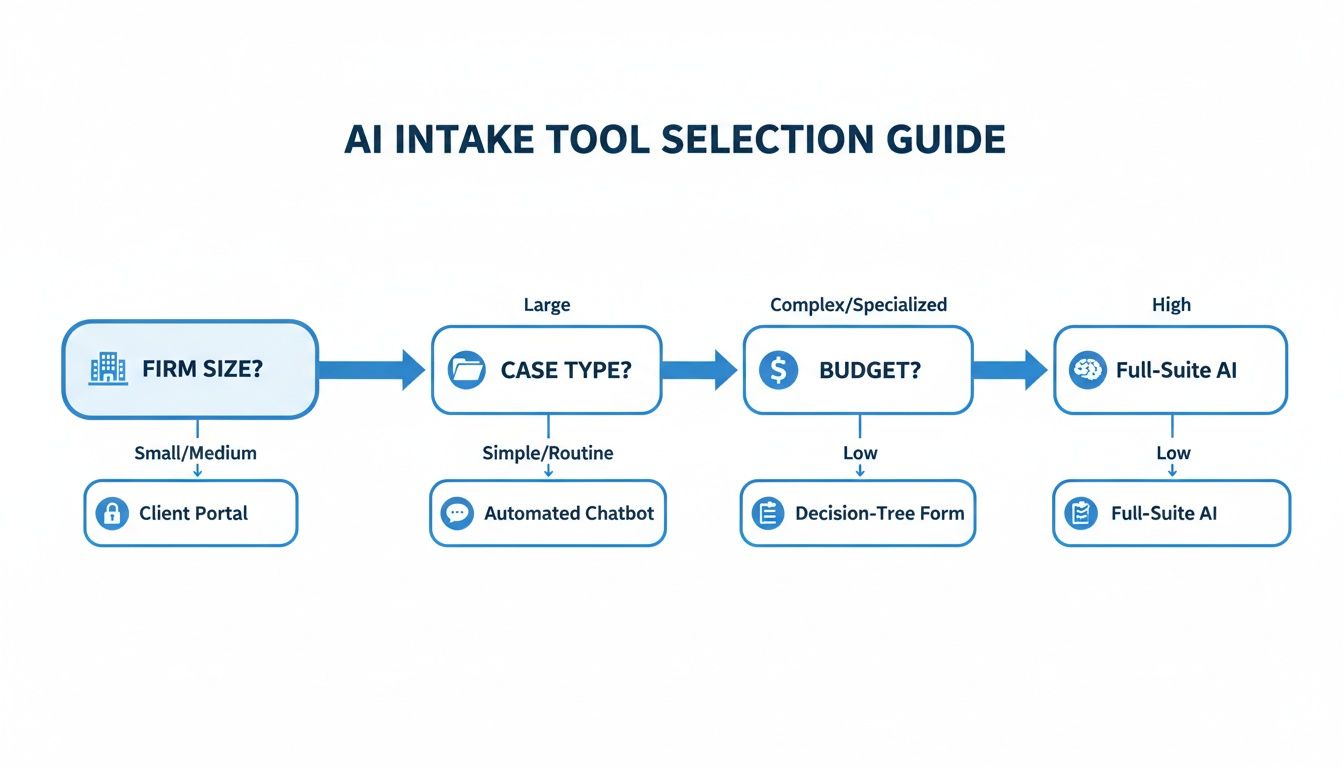
As you can see, the right AI intake automation tool isn't a one-size-fits-all solution. It comes from a logical analysis of your firm’s specific needs.
Use Smart Conditional Logic
Conditional logic is the brains of the operation. It's the "if this, then that" engine that makes your workflow intelligent, ensuring every single lead gets the right response automatically. This is how you deliver a personalized experience without lifting a finger.
Let's walk through a real-world example for that personal injury lead:
-
The "High-Value" Path: A prospect indicates they were in a car accident last week, have serious injuries, and haven't hired an attorney. Your system should immediately recognize this is a high-priority lead. The AI can trigger an instant action: "Based on what you've shared, it sounds like we can help. Please use the calendar below to book a free, immediate consultation with one of our attorneys."
-
The "Not a Fit" Path: On the other hand, what if someone's answers show their case is outside your practice area, like a landlord-tenant dispute? Your workflow needs to provide a helpful, professional off-ramp. Instead of a dead end, try this: "Thank you for sharing your situation. While your case falls outside our area of expertise, the [Local Bar Association] referral service might be a great resource for you. We wish you the best of luck."
This simple act of kindness respects the person's time and leaves them with a positive impression of your firm, even if you can't take their case.
Write Your Prompts with Empathy
Just because it's automated doesn't mean it has to be impersonal. The tone of your messaging is everything. Top firms infuse their automated communications with warmth and professionalism, making the tech feel surprisingly human.
Here are a few practical ways to do it:
- Use Empathetic Language: Start messages with phrases like, "I understand this must be a difficult time," or "Thank you for trusting us with these details." A little compassion goes a long way.
- Set Clear Expectations: Always tell people what’s going to happen next. For example, "After you book a time, you'll receive a confirmation email with all the details for your call with our team."
- Provide an Escape Hatch: Make it incredibly easy to connect with a real person. Always include a direct phone number or a "chat with a human" button for those who need it.
This thoughtful messaging shouldn't stop after the first chat. To keep that connection going, check out our guide on automating client follow-up with AI, which is packed with ideas for nurturing leads after the initial contact.
By designing your workflows with this level of care, you create an AI intake automation system that doesn't just qualify leads—it starts building the strong client relationships that are the lifeblood of any successful law practice.
A Smooth Launch Plan for Your AI Intake System
Rolling out new technology doesn't have to be a high-stakes gamble. A smart, phased approach to implementing your AI intake automation is the key to preventing chaos, building confidence within your team, and making sure the transition is a success from day one. Instead of a "big bang" launch that can overwhelm everyone, the best strategy is to start small, work out the kinks, and then scale up.
This isn't about moving slowly; it's about moving deliberately. By testing your new system in a controlled setting first, you can catch and fix problems before they affect every potential client knocking on your door.
Start Small with a Pilot Program
The best way to kick things off is with a focused pilot program. Think of it as a dress rehearsal. You're not just testing if the software works; you're seeing how it fits into the messy, real-world flow of your firm. This lets you contain any initial hiccups to a small area.
Choose a small team for the pilot—maybe one paralegal and one intake specialist. Another great way to limit the scope is to only run it on leads from a single source, like your website's contact form. The goal here is simple: gather real data and honest feedback. Is the AI actually qualifying leads correctly? Is the contact information syncing properly with your case management software?
This controlled environment is priceless. It’s your chance to tweak workflows, rewrite chatbot prompts, and fix integration bugs without the pressure of a firm-wide deployment.
Let Your Team Break It: User Acceptance Testing
Once the pilot looks promising, it’s time for User Acceptance Testing (UAT). This is where you hand the keys over to the people who will live in this system every single day: your intake team. Their feedback isn't just nice to have—it's critical. They know your intake process inside and out.
Give them realistic scenarios to work through:
- The Slam Dunk: A potential client with a high-value case that’s a perfect fit.
- The Wrong Number: An inquiry that’s completely outside your firm's practice areas.
- The Question Mark: A lead who gives vague or incomplete information.
Watch how the system handles each scenario, but more importantly, watch how your team interacts with it. Their hands-on experience will uncover friction points and awkward workflows you'd never spot on your own. This is how a good system becomes a great one.
UAT isn't just about finding bugs. It's about confirming the tech actually makes your team's jobs easier. If it adds more clicks and complexity than it removes, it’s not ready.
Make Training About More Than Just Clicks
Good training is what separates a powerful tool that collects dust from one that gets results. Your sessions have to go beyond the "how-to" and get to the "why."
You need to sell your team on the vision. Frame the AI intake automation as something that empowers them. Show them how it vaporizes the tedious parts of their job—the repetitive data entry, the back-and-forth of scheduling—so they can focus on what matters: building real relationships with qualified clients.
Make the training hands-on and specific to their roles. What an attorney needs to know is different from what an intake specialist needs. Providing that context helps build genuine buy-in and turns your staff from users into champions of the new process. For more on framing these benefits, see our guide on the AI lead response system for lawyers.
The Final Pre-Launch Checklist
Before you officially go live, one last run-through with a pre-launch checklist ensures you haven't missed anything. This is your final "all systems go" confirmation.
Your checklist should be a quick, final verification of the essentials:
- System Handshake: Are the AI tools and your CRM/practice management software talking to each other without any errors?
- Workflows Locked In: Have all chatbot scripts and automations been updated with the feedback from UAT?
- Access & Permissions: Does every user have the right login credentials and access levels?
- Day-One Support: Who is the designated point person for questions and troubleshooting in the first few weeks?
Following a structured plan like this turns your launch from a risky leap of faith into a well-executed step forward for your firm.
How to Measure and Optimize Your Intake Performance

Getting your AI intake automation up and running isn't the finish line—it's just the start. The real value comes from treating this system as a living, breathing part of your firm's growth engine, something that needs regular attention and fine-tuning. This means moving beyond gut feelings and actually measuring what matters.
By defining and tracking the right key performance indicators (KPIs), you can turn all that raw data into clear, actionable insights. This is how your intake process goes from being a simple administrative task to a data-backed competitive advantage.
Defining Your Core Intake KPIs
Your AI tools and CRM are gathering a mountain of data every single day. The trick is knowing which metrics to watch to get a true read on your performance. While every firm's priorities are a bit different, a few universal KPIs are essential for understanding the health of your client intake.
I always recommend starting with these fundamentals:
-
Lead Response Time: How long does it take from a potential client’s first email or form submission to your first automated response? With AI, this should be under a minute—ideally, just seconds. A slow response is the digital equivalent of leaving someone on hold forever.
-
Consultation Conversion Rate: This one is huge. Of all the qualified leads that interact with your AI system, what percentage actually book that initial consultation? This KPI tells you exactly how effective your automated workflow is at pushing people to the next critical step.
-
Cost Per Qualified Lead: Do the math. How much are you spending on marketing and operations to generate one lead that actually fits your firm’s ideal client profile? Your AI should be driving this number down by weeding out the tire-kickers and mismatched inquiries on its own.
From Data to Diagnosis
Once you’re tracking these KPIs, the real work begins. That analytics dashboard isn’t just for looking at pretty charts; it's a diagnostic tool you can use to spot problems and uncover hidden opportunities. This is where a mindset of continuous improvement really pays off.
For instance, you might see that your chatbot has a really high engagement rate, but your consultation booking numbers are flat. That’s a classic sign of a bottleneck somewhere in the system. The next step is to dig into the chatbot's conversation logs. Where are people dropping off? Are they bailing after one specific question? Maybe your qualification criteria are accidentally too strict, or a question is worded in a way that just confuses people.
By analyzing that journey, you might find that asking for a full mailing address right at the start is scaring people away. A simple fix—like moving that question to after the consultation is booked—could boost your conversion rate overnight.
This isn't just about making things run smoothly; it has a real, quantifiable business impact. We've seen that firms connecting their intake to other downstream automations consistently achieve higher conversion rates and handle more cases. In fact, 77% of firms that credit AI for revenue growth point directly to these kinds of operational improvements as the key driver.
These results prove that AI intake automation is a measurable investment in productivity, a topic you can read more about in this analysis of AI-native law firms.
By regularly reviewing your data and making small, iterative tweaks, you ensure your intake system evolves right alongside your firm. You’ll refine your scripts, adjust your logic, and constantly improve the client experience. This commitment to optimization is what separates a good intake process from a great one.
Common Questions About AI Intake Automation
It's completely normal for firm leaders to be curious but also a bit wary of bringing new tech into the practice. Let's tackle some of the most common questions head-on to help you get a clearer picture and feel confident about what's right for your firm.
Will AI Intake Automation Replace My Intake Staff?
This is probably the #1 question we hear, and the answer is a firm no. Think of AI as a force multiplier for your intake team, not a replacement. It’s designed to handle the tedious, 24/7 work—capturing leads after hours, asking the initial screening questions, and collecting basic data.
This frees up your best people to do what they do best: build real relationships with high-potential clients. Instead of just gathering information, your team can focus their energy on empathetic conversations and providing that critical human touch that actually converts a lead into a client. Your intake specialists evolve into highly effective client relationship managers.
Is It Secure for Sensitive Client Data?
Absolutely essential question. Security isn't just a feature; it's the foundation. Any reputable legal tech provider worth their salt builds their tools with bank-level security protocols, like end-to-end data encryption.
When you're vetting a new tool, you have to do your homework.
- Ask for their security documentation.
- Verify compliance with legal industry standards.
- If you handle any kind of medical information, confirming HIPAA compliance is non-negotiable.
Don't just take their word for it—dig into their security architecture before you let any new software touch your firm's data.
One of the best things about modern AI intake tools is that they’re built for non-technical users. Most platforms have intuitive drag-and-drop workflow builders and straightforward dashboards. This means your office administrator or marketing manager can usually manage the system day-to-day with very little training.
At RankWebs, we provide actionable insights and proven frameworks to help law firms navigate these changes and implement strategies that drive sustainable growth. Learn more at https://rankwebs.com.